CPTD HISTORY: control and transparency
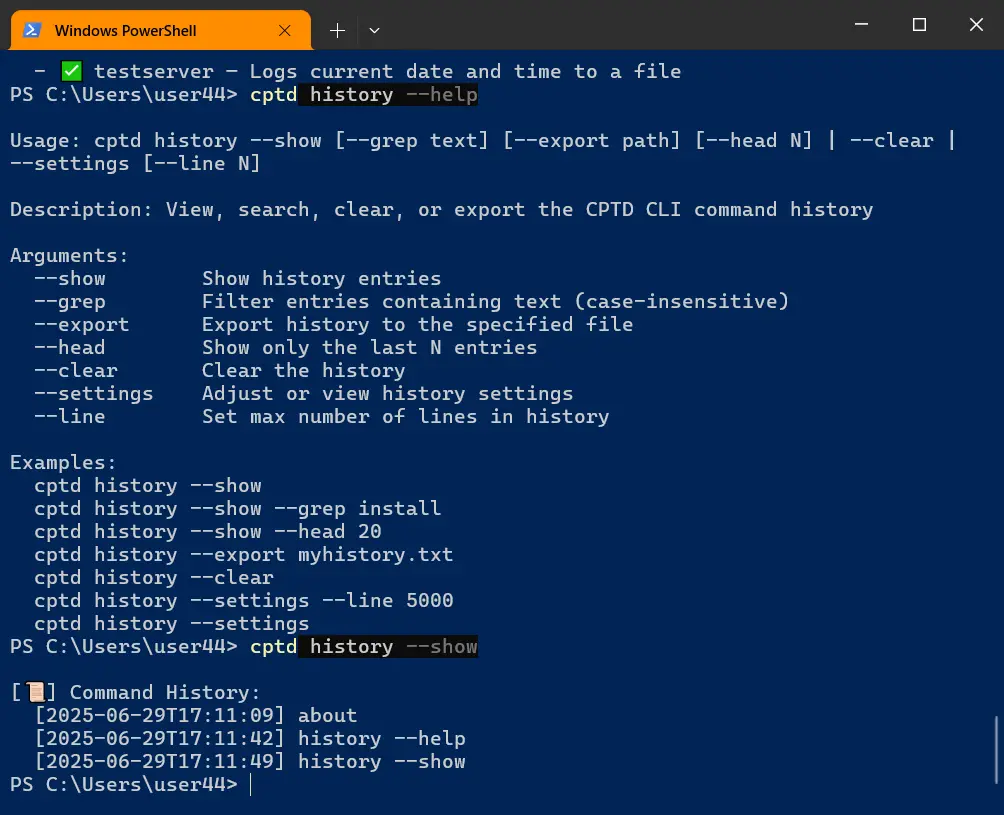
Within CPTD CLI, the cptd history command allows you to view, analyze, and manage all commands you have executed.
In CPTD CLI, process transparency is as important as automation. You should always know which commands were executed, with what parameters, when, and in what order.
This is essential for auditing, debugging, learning, and maintaining a systematic approach to managing your workflows.
What cptd history offers
✅ Displays a complete log of all executed CPTD CLI commands.
✅ Filters history by keywords for quick search and retrieval.
✅ Exports history to a file for analysis, storage, or reporting.
✅ Allows you to limit the number of stored history lines to manage log size.
✅ Supports clearing the history on demand.
✅ Allows you to view and modify history settings to fit your workflow needs.
Usage
cptd history supports convenient prefixes:
--show— display the entire history.--grep <text>— filter by keyword or parameter.--export <path>— save history to the specified file.--head <N>— show the last N commands.--clear— clear the history.--settings— view or adjust history settings.--line <N>— set the maximum number of stored lines.
Examples:
cptd history --show
cptd history --grep backup
cptd history --export history_log.txt
cptd history --head 20
cptd history --clear
cptd history --settings
cptd history --line 500
Why you need cptd history
• To never forget critical commands and their parameters during your work.
• For quickly re-running successful commands without errors.
• To generate reports and understand your workflow history.
• To debug automation chains and DSL scenarios efficiently.
• To build your own structured system for managing and analyzing processes.
Advantages
✅ Works fully offline, with no hidden connections.
✅ No telemetry, no tracking.
✅ Supports Windows, Linux, and macOS.
✅ Integrates seamlessly with other CPTD CLI commands and DSL workflows.
✅ Speeds up your processes while helping you learn to analyze your actions systematically.
Integration with CPTD CLI
cptd history is part of the CPTD CLI ecosystem, where every command and every execution becomes a controlled step in your workflow.
You can create new commands, build automated chains, and see your system operating transparently through a unified log.
Conclusion
cptd history within CPTD CLI is a simple yet powerful tool for control and analysis that helps you systematize your work and strengthen discipline in your automation workflows.
Start using CPTD CLI and the cptd history command today to manage, automate, and grow with structure.
Download and start (type in any terminal):
pip install cptd
pip install cptd –upgrade
This command is part of CPTD.